Waterpark Simulator Save File Location and Lost Park Fix
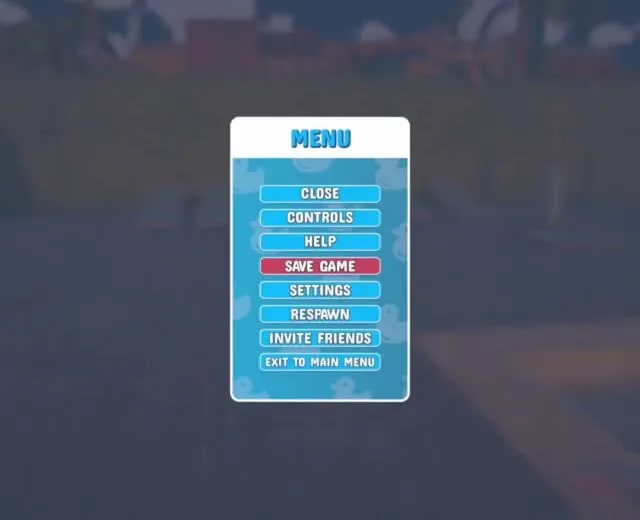
On Windows, Waterpark Simulator keeps each park as an .es3 file in %USERPROFILE%\AppData\LocalLow\CayPlay\WaterparkSimulator\slots, with up to ten .bac backups beside it. Saves also sync through Steam Cloud. For a missing park, the developers first check the Steam profile and Steam Cloud; a broken one can be restored by renaming a backup.
Where the save files are
Windows — saves
%USERPROFILE%\AppData\LocalLow\CayPlay\WaterparkSimulator\slotsPress Win + R, paste the line, press Enter. AppData is hidden in File Explorer by default, which is why browsing to it by hand often fails.
Steam Deck and Linux (Proton)
<SteamLibrary>/steamapps/compatdata/3293260/pfx/drive_c/users/steamuser/AppData/LocalLow/CayPlay/WaterparkSimulator/slotsThe same folder inside the game's Proton prefix. The Steam Deck page covers the rest of running it there.
One level up, in the WaterparkSimulator folder itself, sit settings.json, the player and player-prev log files the developers ask for when something breaks, and the place the game reads your custom park logo from. Consoles do not give you file access, so the folder steps on this page are PC and Steam Deck only.
| What you find | What it is |
|---|---|
| A park file ending in .es3 | The live save for that park, one per slot. |
| .bac, .bac2, .bac3 … beside it | Automatic backups, up to ten. |
| settings.json (one folder up) | Your graphics, controls and accessibility settings. |
| player.log and player-prev.log (one folder up) | This session's log and the previous one. |
When the game saves
Save Game is on the pause menu, between Help and Settings, and shows a Game saved message when it works. The game is also meant to save by itself at the end of each shift, when it gets dark and guests start leaving. An early August patch also added a confirmation when you quit, which the notes summed up as "no more accidental closing of game without saving".
If Save Game ever seems to do nothing, finish the day so the end-of-shift save has a chance to run before you quit.
Restore a park from its backups
This is the developers' own recovery method, from the pinned help thread they link in reply to lost-save posts. It works when a park file exists but will not load, or loads broken.
- Quit the game completely.
- Open the slots folder above and copy the whole folder somewhere else as a safety copy.
- Find the park's .es3 file and the backups next to it.
- Move the broken .es3 out of the folder, then rename a backup to take its place. The developers' example: park.es3.bac1 becomes park.es3.
- Start the game and load the park. If it is still broken, repeat with the next backup down.
A park that vanished, or shows greyed out
When players post that a park is gone, the developers' replies keep coming back to Steam Cloud before file corruption. Work through their questions before touching any files.
- Same Steam profile? Saves belong to the account that played. Asked about an empty save list, the developer's first question was "Are you sure you are in the same Steam profile as you were?"
- New computer? The developer's advice was to check that Steam Cloud is switched on in Steam's settings.
- Shared PC? When a multiplayer save stopped loading and a custom character vanished, the developer's reply was "Sounds like Steam Cloud. Do you share the PC with someone else?"
- See what Steam actually holds: Steam's remote storage page for the game lists every cloud file with its date, and you can download one from there.
- Greyed-out park that will not open: the developers sent that player straight to the backup method above.
- Deleted it with the X on the continue screen: download the cloud copy, check the name has no spaces, and if the game still will not see it, email support@cayplay.com.
“Unless your computer and the servers at Steam burn down (if you have Steam cloud saves enabled) your save is ...welll safe?”
That answer was about moving from Early Access to 1.0, and it held: players have carried Early Access parks, one of them about a year old, into the full game. The one thing that does not carry is a layout between maps. The beach map needs a new park.
The same folder holds your custom logo
The custom park logo is read from the WaterparkSimulator folder one level above slots, so the Win + R line above without the \slots on the end opens it. Size, framing, the restart it needs and why it is single-player only are on the park name and logo page.
If none of this brings it back
Email support@cayplay.com or open a ticket on the official Discord, and attach the slots folder plus player.log and player-prev.log. The developers have asked players for save files before, both to fix bugs and, in September, to study finished parks while planning 1.1. Crashes, black screens and stuck loading screens are separate problems with their own fixes on the troubleshooting page, and the developers do not offer older builds to roll back to, because they say rolling back can break saves.
References
- PCGamingWiki — Waterpark Simulator (save and config locations, Steam Cloud)
- Steam Community — Need help? Read this first (backup recovery, pinned)
- Steam Community — Save Game Deleted - How do I get the game to recognise Steam Cloud download
- Steam Community — I may just be an idiot but I CANNOT get my save file back
- Steam Community — EVERYTHING is gone when i open the game
- Steam Community — save file glitch
- Steam Community — lost every single saves
- Steam Community — Do we get to keep our current game once the early access is over?
- Steam — remote storage for Waterpark Simulator
- Mathias Does Tech — How To Save Game in Waterpark Simulator (YouTube)
Related
- waterpark simulator crashingFor stutter: open Settings, go to Video, and max the FPS Limit slider — disable vsync firs…
- waterpark simulator updateThe newest Waterpark Simulator update is 1.0.93, released on 16 September 2026: a small pa…
- waterpark simulator how to change park nameOpen the tablet (Tab on PC), go to the Park section and type a new name into Rename Park. …
- waterpark simulator steam deckYes, with caveats. Valve rates it Playable rather than Verified. The flagged issues are in…
- waterpark simulator multiplayerYes. Waterpark Simulator has online co-op for up to 4 players including the host, on the s…
- waterpark simulator mods not workingThe game switched its scripting backend from Mono to IL2CPP, and that broke essentially al…