Waterpark Simulator Staff Guide: Hiring and Vendors
Hire and fire from the park management menu under Staff. Prioritise lifeguards, cleaners and mechanics over convenience hires. A vendor works one stall until you unlock multi-stand, added in update 1.0.91 and available from 2 stars since 1.0.93. Star Employees have better stats, and the Staff Overflow research lets you exceed the cap for a daily tax.
Where the hiring screen is
- Open park management and select Staff.
- Browse the available hires — each shows their stats.
- Hire, or fire someone to free a slot if you are at your limit.
- Assign the new hire to a role or a specific station.
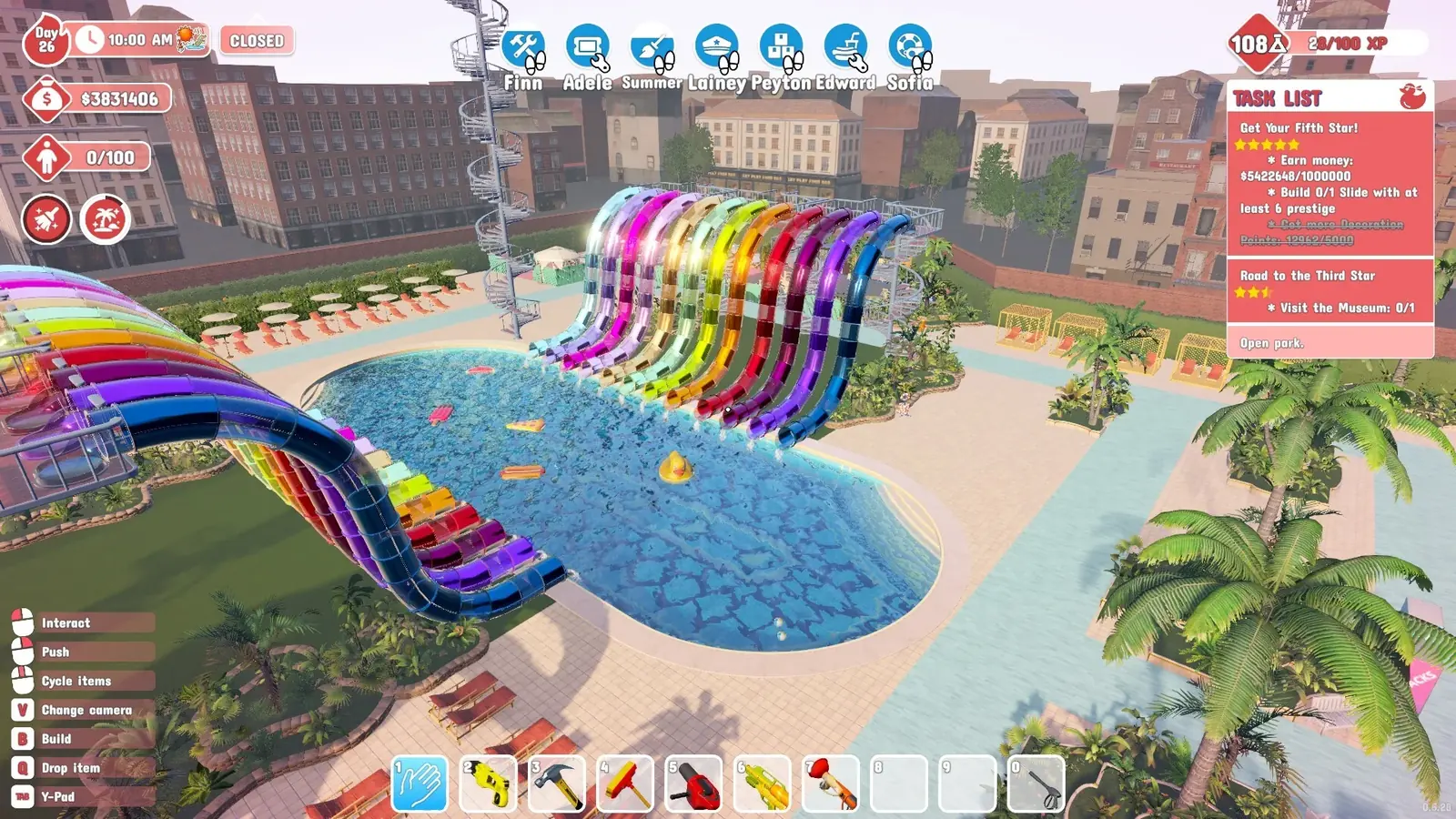
Your hired staff appear as named icons along the top of the screen during play, each with a small symbol showing what they are assigned to do. That bar is your at-a-glance view of who is working and who is idle.
Who to hire first
The ordering principle is simple: anything that prevents a rating loss beats anything that adds convenience. Your park rating drives revenue, so protecting it comes before saving yourself clicks.
| Role | Priority | Why |
|---|---|---|
| Lifeguard | First | Guests drown without them, and drownings tank your rating fast |
| Cleaner | First | Mess accumulates constantly and hits the cleanliness rating |
| Mechanic | Early | Broken slides sit idle and stop earning |
| Vendor | When proven | Only once a specific stall shows steady demand |
| Restocker | Optional | Convenience only — you can run without one |
Star Employees and super staff
Some hires have a star next to their name. According to the 1.0 patch notes and the developer's forum replies, star hires are the studio's own team, and the star does not promise better stats, so read the stats before you pay for one. The lifeguard role has two of them: Calum and Sophia. If you stream, viewers can also claim upcoming hires with !hireme through the Twitch integration.
The 1.0 era added a tier above that: super staff. Kade is a super lifeguard who is not only efficient but comes with his own personality, obtained through a secret method rather than the normal hiring list. Quackso is a super mascot, added because players kept asking for a way to get a good Queso — they appear in the usual hiring list.
Super staff are the closest thing the game has to a best-in-slot hire. If you are optimising, a super lifeguard covers a busy pool complex that would otherwise need two ordinary lifeguards. Every star hire players have rolled, plus the two you unlock from wall posters, is listed on the star staff page.
Assigning vendor staff
Vendors are the part that confuses people most, because they are not a floating pool of workers. A vendor is bound to the stalls you assign them to and will not wander to an unstaffed one. Early on that means one vendor per stall you want open — until the multi-stand unlock, which is the single biggest change to how vendors work.

- Build a stall and watch whether guests queue at it.
- Only add a vendor once that stall shows steady demand — an idle vendor still costs wages.
- Assign the vendor to that specific stall.
- Repeat per stall. Until you research multi-stand, every staffed stall needs its own vendor.
Because each stall costs a headcount slot, spamming stalls early burns your staff limit on stations nobody is using. Let demand prove itself before you commit a vendor.
Running out of slots: Staff Overflow
There is a cap on how many people you can employ. Once you hit it, the Staff Overflow research is what lets you go past it — at a cost.
- Tree
- Maintenance
- Position
- 5th along the bottom
- Effect
- Hire to 200% of cap
- Cost
- End-of-day tax
It sits on the bottom row of the maintenance research tree, so you pass several other unlocks before reaching it. Every employee above your normal cap is charged at the end of the day, so the more you overflow the bigger the daily bite out of your takings.
When Staff Overflow is worth it
- Your park is large enough that cleaners and mechanics cannot cover the ground.
- Daily income comfortably absorbs the extra wages plus the tax.
- You are pushing a star objective that needs the park spotless at a specific moment.
Earlier than that, the research points are usually better spent on unlocks that raise income rather than ones that raise your ability to spend it. Staff Overflow is a late-game tool, not an early crutch.
Giving a member of staff the day off
Update 1.0.91 added a Day off button to staff management. Open the staff panel, select an employee, and the button sits beside Fire under their stat block. They take the day and you pay them nothing for it, which makes it a way to trim wages on a quiet day without losing the hire and their level.
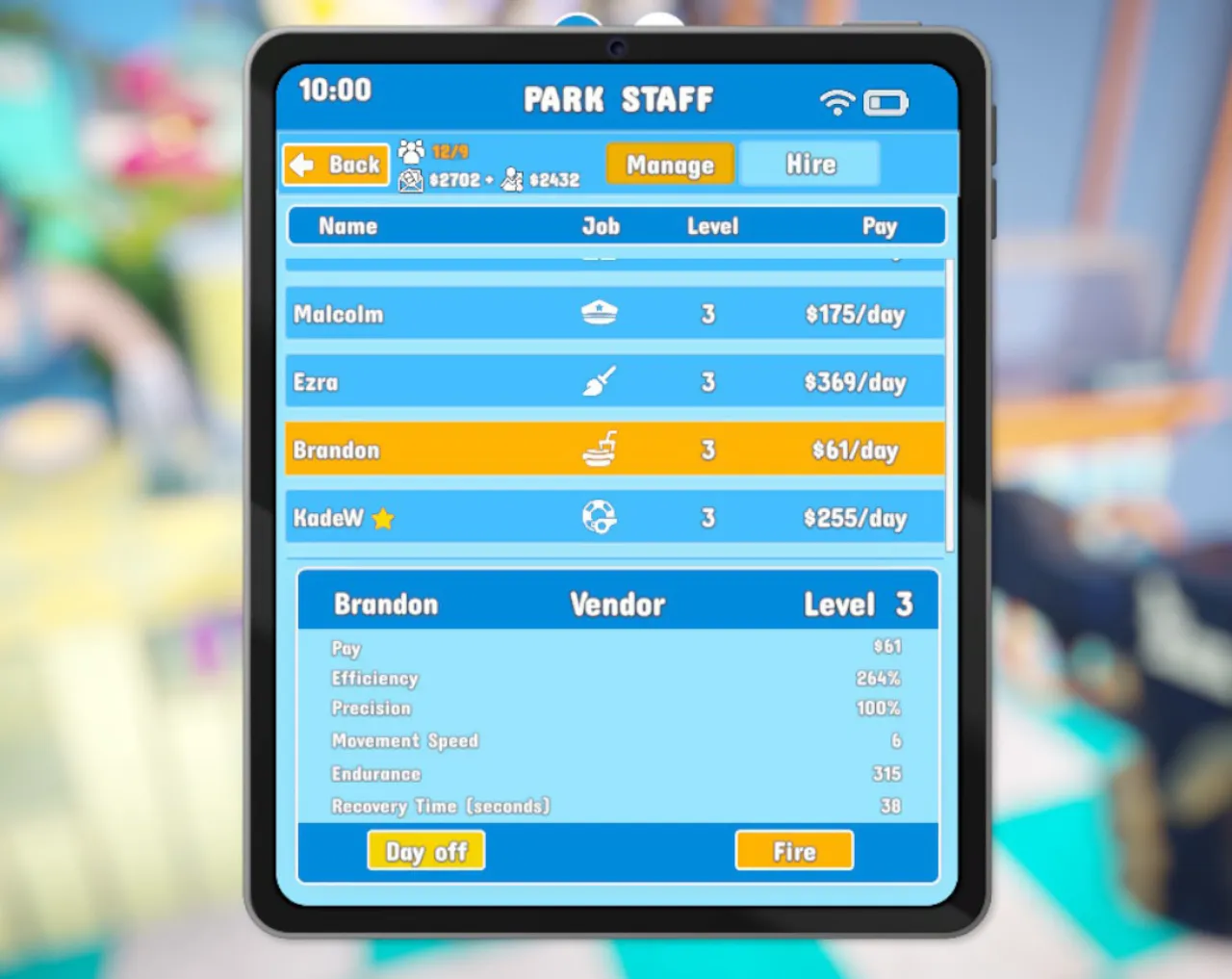
- It is only available in the early part of the day. The developers closed the obvious exploit: you cannot work someone all day and then hand them a free one in the last hour.
- It is also a quest tool. Some objectives ask you to do a job yourself, and a staff member who keeps doing it first blocks you — giving that employee the day off clears them out of the way. The task list page covers which objectives behave like this.
- Firing is still separate and still loses the employee's level, so use the day off when you only want them gone for a while.
Automating staff duties on PC
If staff management stops being fun and starts being admin, PC players have mods for it. The most-downloaded uploads on Nexus Mods set all hired staff stats to maximum, give staff unlimited energy so they never rest, and auto clean and repair the whole park.
Those are effectively cheats delivered as mods, and they are PC-only. Console players manage staff by hand. Whichever you choose, the underlying priorities — lifeguards and cleaners first — do not change.
References
Related
- waterpark simulator research pointsCleaning graffiti with an upgraded mop and spraying guests with the water gun are the two …
- waterpark simulator 5 star parkFive stars asks for $500,000 earned plus two slides at 4 prestige. The Diamond tier after …
- waterpark simulator chlorineClean pools with the sponge-mop or the power washer. Draining and refilling clears contami…
- waterpark simulator updateThe newest Waterpark Simulator update is 1.0.93, released on 16 September 2026: a small pa…
- waterpark simulator task listThe task list is the panel in the top right. It groups objectives under the quest that iss…